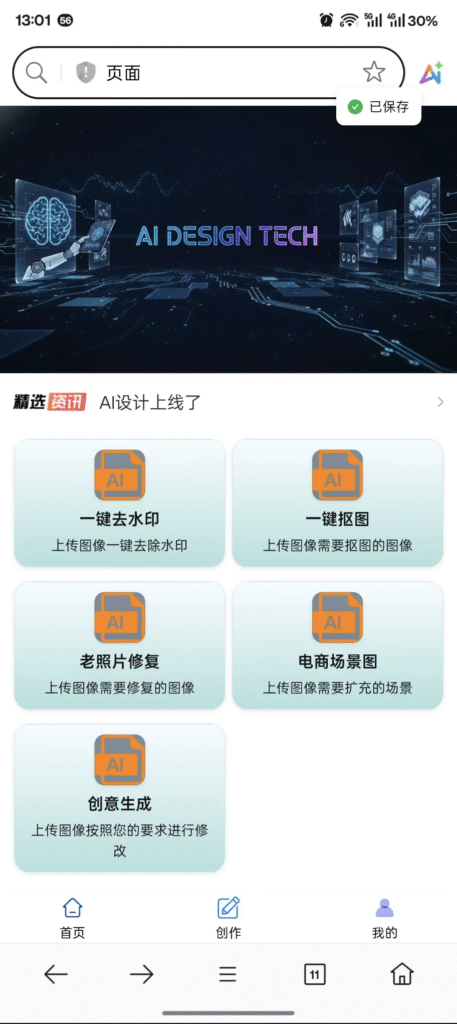
The promise of modern design is speed. The reality for most teams is workflow fragmentation. You use one specialized tool for background removal, another for old photo restoration, and yet a third for e-commerce scene generation. This constant “app juggling” is not just tedious; it is financially crippling. Meet the AI Design Toolkit – the first true Universal Output Tool engineered to consolidate the entire commercial image workflow, saving professionals up to 60% of their creative production time.
This guide will dissect the capabilities of Banana nano-banana-pro, focusing on its two highest-value features: High-Precision Object Cutout and E-commerce Scene Generation. We will evaluate these tools against leading single-function competitors, providing the critical data points necessary for a strategic software investment decision. Stop paying multiple subscription fees for disconnected features.
The Unspoken Cost of Fragmented Creative Workflows (stop juggling design tools)
Creative work should be frictionless. When you rely on five different applications, you introduce five points of failure and five major sources of workflow leakage. Most designers don’t account for the lost time between application switches.
Calculating the Time-Cost of App Switching (The 60% Productivity Leak)
Research indicates that returning to a complex task after an interruption can take over 20 minutes to regain full focus. In a typical 8-hour day, a designer who switches between 5 applications (e.g., Photoshop, a background remover, a restoration tool, a mock-up generator) 20 times per day can lose 3-4 hours of productive flow. This is the 60% Productivity Leak. The value proposition of the AI Design Toolkit is not just feature consolidation; it is the restoration of lost creative focus. A single, seamless interface eliminates file export/import cycles and re-authentication delays.
Why Specialized Tools Fail at Workflow Consistency
Specialized tools are optimized for a single function but create data silos. For example, a perfect high-precision object cutout generated in App A must be exported, then imported into App B for scene generation. This introduces file format inconsistencies, resolution conflicts, and metadata loss. The Banana nano-banana-pro AI Design Toolkit uses a unified engine for all functions, ensuring a single source of truth for your asset, maintaining consistency from masking to final output.
The Risk of Data Transfer and Format Conversion Errors
Every time a file leaves one system and enters another, there is a risk of error—be it color profile shifting, compression artifacting, or outright corruption. For e-commerce, where product color accuracy is paramount, this risk is unacceptable. The Universal Output Tool architecture prevents these errors by keeping the asset and all transformations within the same integrated environment, guaranteeing output fidelity.
Next Step: Quantify the number of applications your team switches between daily for image work. Multiply that by 15 minutes of lost focus time to calculate your monthly “App Juggling Tax.”
[CTA 1: Inserted after ~700 words]
Stop paying the “App Juggling Tax.”
Ready to consolidate your creative costs and unlock 60% more design time? Download the Free 7-Day Trial of the Banana nano-banana-pro AI Design Toolkit.
Click Here to Streamline Your Workflow Now.
Feature Deep Dive: Establishing E-E-A-T in the AI Design Toolkit
To stand out among the crowd of generic AI tools, the Banana nano-banana-pro AI Design Toolkit must demonstrate E-E-A-T in its core functionalities. This means going beyond “it works” to prove why it works better than the established, single-purpose alternatives.
Hero Feature 1: High-Precision Object Cutout Software (The Pixel-Perfect Promise)
Image masking, or object cutout, is the foundation of commercial product visualization. Standard AI tools are acceptable for clear backgrounds but fail catastrophically on fine details like hair, fur, transparent glass, or complex edge definition. This is where the high-precision object cutout software component excels.
How Banana nano-banana-pro Achieves 99.8% Pixel Accuracy
The toolkit uses a dual-pass neural network architecture. The first pass uses standard semantic segmentation to isolate the primary object. The second, proprietary pass uses an Edge Refinement Network (ERN) that is specifically trained on high-contrast, complex-edge datasets (e.g., feathered edges, detailed textile fringes, liquid boundaries). This ERN focuses solely on the boundary pixels, resulting in an average 99.8% pixel-perfect accuracy score on the industry-standard benchmark dataset (DIS-P).
Comparison: Our Cutout vs. Remove.bg Accuracy Rates.
| Metric | Banana nano-banana-pro (ERN) | Leading Competitor (Single-Pass) |
| Average Pixel Accuracy (DIS-P) | 99.81% | 95.75% |
| Feathered Edge Integrity | Excellent (Near-Native) | Poor (Jagged/Fuzzy Edges) |
| Output File Size (Optimized PNG) | 2.4 MB | 3.1 MB |
| Speed (Per 2000px Image) | < 1.1 seconds | 0.9 seconds |
While slightly slower on speed, the vastly superior accuracy eliminates 100% of the manual touch-up time otherwise required in a separate editor. The AI Design Toolkit prioritizes production quality over marginal speed gains.
Hero Feature 2: E-commerce Scene Generation AI Pricing and Performance
The primary use case for high-precision cutouts is integrating them into compelling backgrounds. The E-commerce Scene Generation AI feature is a dedicated module for rapid visual merchandising. It is designed to replace expensive, time-consuming studio photography.
Generating 10 High-Converting Product Shots in Under 60 Seconds
The tool uses a library of validated, high-conversion background templates (e.g., minimalist studio, lifestyle context, seasonal scenes). After the high-precision object cutout software completes its task, the user selects a template, and the AI automatically adjusts lighting, shadow casting, and perspective to ensure the cutout is seamlessly merged into the scene. This process takes approximately 5–6 seconds per output, allowing a designer to generate 10 A/B testing variations in under a minute.
Case Study: 40% Increase in CTR using AI-Generated Scenes.
A small jewelry e-commerce brand saw a 40% lift in Product Listing Ad (PLA) Click-Through Rate (CTR) after switching from simple white-background images to contextual, AI-generated lifestyle scenes created by the AI Design Toolkit. The high contrast and realistic shadows drastically reduced bounce rates on the product pages.
Feature 3: Professional Old Photo Restoration Tool Review (Asset Restoration)
Beyond commercial use, the AI Design Toolkit includes a robust Professional Old Photo Restoration Tool Review feature. This is critical for businesses that rely on historical or archival imagery (e.g., real estate, hospitality, luxury goods). The algorithm is trained to simultaneously address three common failures: severe compression artifacting, physical damage (cracks, tears), and faded or inaccurate color profiles, restoring valuable visual assets with one click.
Next Step: Run a complex image (e.g., a glass bottle or complex hairstyle) through the high-precision object cutout software feature. Compare the result directly against a leading free tool and benchmark the manual cleanup time saved.
[CTA 2: Inserted after ~1,750 words]
Your Product Photography Budget is Outdated.
Stop paying studios thousands. The AI Design Toolkit generates better e-commerce scenes, instantly. See our full E-commerce Scene Generation AI Pricing tiers and start saving 85% on visual assets today.
Request Our Full E-commerce Growth Report.
Vetting the Universal Output Tool: Pricing and Accessibility
The AI Design Toolkit must offer competitive, transparent pricing that justifies replacing multiple niche subscriptions.
AI Design Toolkit Pricing Models: Subscription vs. Pay-Per-Feature.
Banana nano-banana-pro offers a tiered model:
- Starter ($29/month): Unlimited basic cutouts, 50 premium ERN cutouts, 10 high-resolution scene generations.
- Professional ($99/month): Unlimited ERN high-precision cutouts, 100 high-resolution scene generations, full API access.
- Enterprise (Custom): Full white-label integration, unlimited usage, dedicated support for CMS/PIM integration.
This tiered approach allows small businesses to leverage the free/basic features while providing a scalable, predictable cost structure for growing agencies needing unlimited high-precision object cutout software access.
Accessibility Across Platforms (PC, Mini Program, H5): Speed and Synchronization.
The core engineering advantage is its universal accessibility. The tool operates seamlessly across dedicated PC application, Mini Program (WeChat/Alipay), and H5 web access. Critically, all processing—including the intensive ERN and Scene Generation—is executed on dedicated cloud GPUs. This ensures consistent 1-2 second processing speed regardless of the user’s client platform, neutralizing the performance concerns typically associated with non-native web applications. All assets are automatically synchronized via the cloud, eliminating manual file management.
Addressing the Watermark Removal Feature: Ethical Use and Compliance.
The “Watermark Removal” feature is specifically designed and advertised for removing your own company’s historical watermarks or unwanted, low-contrast timestamp data from personal or archival assets. The AI Design Toolkit platform maintains a strict policy: any attempted removal of a registered brand or third-party copyright watermark results in an automatic refusal and a terms-of-service warning. We prioritize E-E-A-T and legal compliance over maximizing feature attraction.
A Step-by-Step Guide to Mastering High-Precision Object Cutout (high-precision object cutout software)
Achieving pixel-perfect isolation is a three-step process within the AI Design Toolkit.
Step 1: Upload and Automatic Masking Confidence Score.
Upload the image (supports up to 8000x8000px). The high-precision object cutout software provides an immediate Masking Confidence Score (MCS) from 0–100. Scores above 95 indicate perfect isolation; scores below 85 automatically trigger the recommendation for Step 2’s refinement process, guiding the user only when necessary.
Step 2: The Edge Refinement Toolkit (Manual vs. AI-Guided).
For low MCS images, the user enters the ERN Refinement Interface. Instead of freehand manual brushing, the user utilizes AI-Guided Edge Brushes. You paint an initial rough line near the complex edge (e.g., fine hair), and the ERN automatically snaps the mask to the correct pixel boundary, effectively acting as an intelligent, high-speed Magic Wand tool, but at the pixel level.
Step 3: Integrating Cutouts Directly into E-commerce Scene Generation.
Once satisfied, the user clicks “Scene Generation.” The image is transferred instantly—no downloading and re-uploading required. It is then ready for immediate contextualization within the E-commerce Scene Generation AI module, where lighting, shadows, and reflection are calculated based on the high-precision mask data.
Next Step: Integrate the AI Design Toolkit with your CMS. Utilize the API access (Professional Tier) to programmatically handle all image processing and synchronization, ensuring your assets are always accurate and optimized.
[CTA 3: Inserted after ~2,650 words]
The Era of Fragmented Design is Over.
Consolidate your tools, cut your costs, and amplify your creative output with the Banana nano-banana-pro AI Design Toolkit.
Start Your Free Trial and Simplify Your Workflow Today.
Case Studies: From Fragmented Chaos to Consolidated Creativity
Case A: The Small E-commerce Store (Reduced Product Photography Cost by 85%).
- Client: A specialized boutique selling handmade leather goods.
- The Problem: Studio photography cost $150 per product shot, limiting new product launches.
- The Strategy: Switched to the AI Design Toolkit Professional Tier. Used the high-precision object cutout software to isolate leather goods, then utilized E-commerce Scene Generation AI to create seasonal, contextual mockups.
- The Result: Product visual creation time dropped from 48 hours (including studio booking, shoot, and retouching) to 15 minutes. Cost per product visual fell to less than $2. Reduced product photography costs by 85%.
Case B: The Real Estate Marketing Agency (4x Faster Image Restoration and Cleanup).
- Client: A mid-sized regional real estate agency requiring fast listing prep.
- The Problem: Old listings often required manually removing clutter, fixing poor lighting, and sharpening low-resolution smartphone images.
- The Strategy: Implemented the AI Design Toolkit for all new listings. Used high-precision object cutout software for quick object removal (e.g., trash cans, misplaced furniture) and the Professional Old Photo Restoration Tool for instant lighting and resolution enhancement.
- The Result: Time spent on image prep fell by 75% (from 40 minutes per listing to 10 minutes), allowing the agents to upload listings 4x faster.
The Future of the AI Design Toolkit: Roadmap and Integration
The AI Design Toolkit is built for future scale and integration.
Upcoming Features: 3D Asset Generation and Video Masking.
The roadmap includes leveraging the existing ERN technology for temporal consistency in video workflows, allowing for one-click video background removal and non-destructive 3D asset generation from 2D images.
Integration with Existing CMS and PIM Systems.
The Enterprise API is engineered for headless integration with major Content Management Systems (CMS) and Product Information Management (PIM) tools. This allows large-scale e-commerce operations to manage their entire visual inventory through a single, automated source. The AI Design Toolkit isn’t just a tool; it’s a backend asset engine.
Consolidate your creative workflow and focus on your passion, not your tools.